
FlavorDraft 2.0 is here. Made for iPhone Duo.
Save recipes from videos, websites, photos and more, then keep them together in one personal cookbook, on iPhone and iPhone Duo.


New in 2.0
Made for the way you cook.
On iPhone Duo, FlavorDraft lies open like a book, stands beside you in Cook View and closes into one hand.
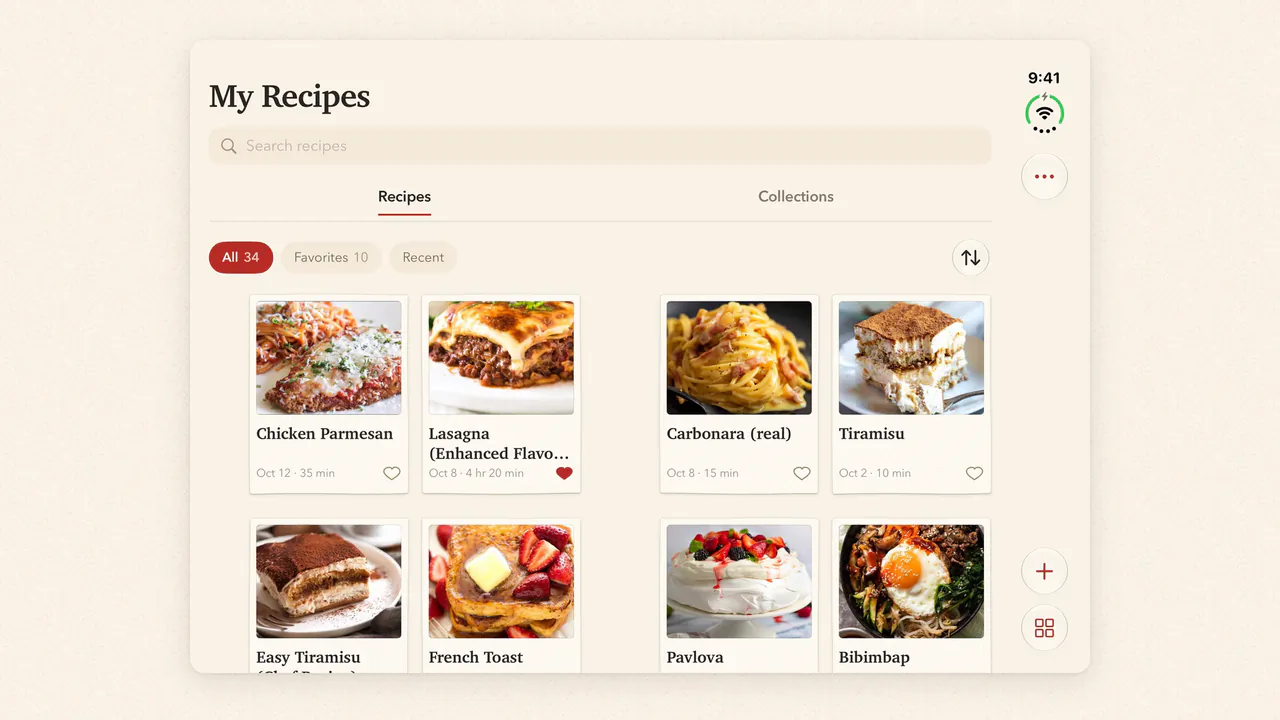
- Unfolded. Your cookbook across two pages.
- Partly folded. Cook View sets the step above and the controls below, and Next turns the page.
- Folded. The same cookbook in one hand.
Cook the videos you save.
Paste a link to a public post on TikTok, Instagram, Facebook or YouTube. FlavorDraft reads the recipe out of it and writes it into your cookbook, with ingredients and steps you can cook from.
Posts that list their ingredients in the caption or description read best. When one doesn’t, FlavorDraft listens to the video for the ingredients and steps, and anything it misses you can fill in afterwards.


Every recipe. One cookbook.
A link, a video, a photo of a cookbook page, the back of a box, or a dish you describe in a few words. Wherever it starts, it ends up as a recipe card in a cookbook that’s yours.
Six ways in
- Scan a recipe
- Scan food packaging
- Import from link
- Import from social media
- Describe a dish or idea
- Add manually


Make recipes fit you.
Ask Draft with AI for what you want, in your own words: healthier, higher in protein, lower in sodium, enough for six.
It answers on the page, then marks up the recipe like an editor: what goes is struck through, what’s new is written in. Nothing changes until you choose Apply Changes.


Cook one step at a time.
In Cook View every step gets a page of its own, set large enough to read from across the counter. Tap Next and the page turns. A step’s timer keeps running while you get on with the next one.


A place for every recipe.
Collections are the sections of your cookbook: weeknight dinners, desserts, the things you make on repeat. A recipe can sit in as many as you like, and you can put them in your own order.


Your recipes, beautifully kept.